Are you looking for a pedalboard for Ableton Live, a live looping solution, or a MIDI controller for foot-controlled playback in Ableton? Find answers to the most frequently asked questions about Loop4Live.
Loop4Live and live looping
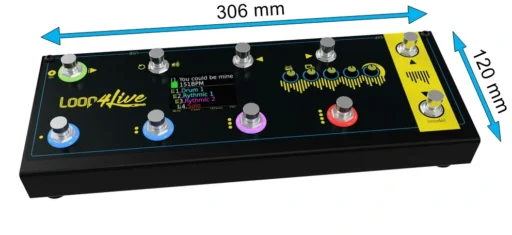
Loop4Live is a MIDI pedalboard designed to control Ableton Live with your feet. In particular, it allows you to launch and record clips, navigate the Ableton Live grid, control scenes, and change the tempo without having to use a mouse. The Loop4Live MkIII features 10 footswitches, 5 rotary encoders, a display, and LED rings that show the status of clips.
Loop4Live is a MIDI controller designed for looping with Ableton Live. It does not replace Ableton Live: it allows you to control its looping and playback functions with your feet. Loops are recorded directly into Ableton Live’s clip grid, which then lets you organize and edit them in your project.
Yes. Loop4Live was designed to make live looping with Ableton Live easier. For example, you can record a guitar, vocals, or another instrument into a clip, then trigger other loops or samples with your foot while continuing to play.
Yes. Loop4Live can be used with a guitar, bass, keyboard, or any other instrument integrated into your Ableton Live setup. It is particularly well-suited for musicians who want to control loops, samples, backing tracks, and effects with their feet.
Loop4Live and Ableton Live
Yes. Loop4Live is specifically designed for Ableton Live.
Loop4Live requires Ableton Live 9.6 or later. Recent versions of Ableton Live are also supported. Loop4Live is compatible with all editions of Ableton: Lite, Intro, Standard, and Suite.
Yes. Loop4Live can be used with Ableton Live 12.
No. Ableton Live is not included with Loop4Live. You must have your own Ableton Live license.
No, Loop4Live is specifically designed to work with Ableton Live. The control functions dedicated to looping and the clip grid are based on its integration with Ableton Live.
Controlling Ableton Live with feet
Yes. Loop4Live's footswitches let you select and trigger clips directly from the pedalboard.
Yes. Loop4Live lets you trigger the recording of clips in the Ableton Live grid without having to use the mouse.
Yes. The main controls for playing and stopping clips are accessible via the foot controls.
Yes. One of the features of Loop4Live is the ability to start and stop multiple tracks simultaneously using scene control.
Yes. Loop4Live has controls that let you navigate through scenes and tracks in the Ableton Live clip grid.
Yes. Loop4Live allows you to access the tempo and use a Tap Tempo feature. Tags can be placed in scene names to automate tempo changes between scenes.
Yes. The recording length of clips can be set using the foot controller (in beats: 1 bar, 2 bars, 4, 8, etc.). Tags in the names of scenes and tracks can be used to set this length in order to automate transitions between them.
Yes. The pedal's free mode allows you to control Ableton's looper plugin. More information.
Yes. Samples, audio loops, and backing tracks can be placed in Ableton Live's clip grid and then triggered using Loop4Live.
Installation and Configuration
Loop4Live requires initial setup in Ableton Live. Simply copy the Loop4Live Remote Scripts folder into Ableton to get the pedalboard working. You can then configure the pedalboard’s behavior to best suit your needs. We provide all the necessary resources (Remote Scripts, manuals, etc.) in the Downloads section of our website. In addition, several videos are available on our YouTube page.
Yes. Certain features and behaviors can be customized to adapt Loop4Live to your Ableton Live setup.
You can configure it either by editing a file on your computer or using a Max for Live plugin if you have Ableton Live Suite:

MIDI controllers, effects, and expression pedals
Yes. The Effects mode allows you to enable effects and control their settings using expression pedals.
Up to 5 expression pedals can be connected to the Loop4Live.
Yes. Loop4Live allows you to connect up to 2 external footswitches to add additional foot-controlled features, such as tap tempo, for example, or any other mapped MIDI function.
Yes. The “Free” mode on the pedalboard allows you to customize certain MIDI messages sent by Loop4Live so you can adapt the pedalboard to your setup.
Yes. All of your usual control surfaces can be used with the pedalboard.
Screen and LED Rings
The screen lets you view important information about your Ableton Live set directly from the pedalboard, including scenes, tracks, clips, and tempo.
The LED rings allow you to quickly see the status of the selected clips, including whether they are playing, recording, or paused.
Connectivity, USB, and Power supply
Loop4Live connects to the computer via USB. The Loop4Live MkIII comes with a 5-meter USB cable.
Yes. Loop4Live is compatible with Mac computers.
Yes. Loop4Live is compatible with Windows PCs.
Yes. The Loop4Live MkIII can be powered via USB. An external 9-volt power supply can also be used (not included).
For the Loop4Live MkIII, the recommended external power supply is 9 V / 500 mA, with a 5.5 × 2.1 mm connector and a positive center, as follows:

Loop4Live and Ableton Push 3
Yes, with a compatible Push 3 Standalone setup. Loop4Live provides a dedicated procedure for installing the Remote Scripts and configuring the pedalboard with Push 3: Learn more.
Purchase, Shipping, and Warranty
The Loop4Live MkIII is available directly from our official store here.
Loop4Live products come with a 2-year warranty.
-
Australia
-
Austria
-
Belgium
-
Bulgaria
-
Canada
-
Croatia
-
Czech Republic
-
Denmark
-
Estonia
-
Finland
-
France
-
Germany
-
Greece
-
Hungary
-
Iceland
-
Ireland
-
Italy
-
Latvia
-
Lithuania
-
Luxembourg
-
Netherlands
-
New Zealand
-
Norway
-
Poland
-
Portugal
-
Romania
-
Serbia
-
Slovakia
-
Slovenia
-
Spain
-
Sweden
-
Switzerland
-
UK
-
USA

Do you have any more questions?
Can't find the answer to your question? Contact the Loop4Live team for help with compatibility, installation, or using your pedalboard. Contact Loop4Live


